Guides · Updated 2026-09-28
How to get a Flickr API key
A Flickr API key is issued by Flickr, free of charge, from the App Garden at flickr.com/services/apps/create. You need a Flickr Pro account to create one, the process takes about five minutes, and you get two values back: a key and a secret. Any third-party app that talks to Flickr on your behalf, including Photo Stream Assistant, needs both.
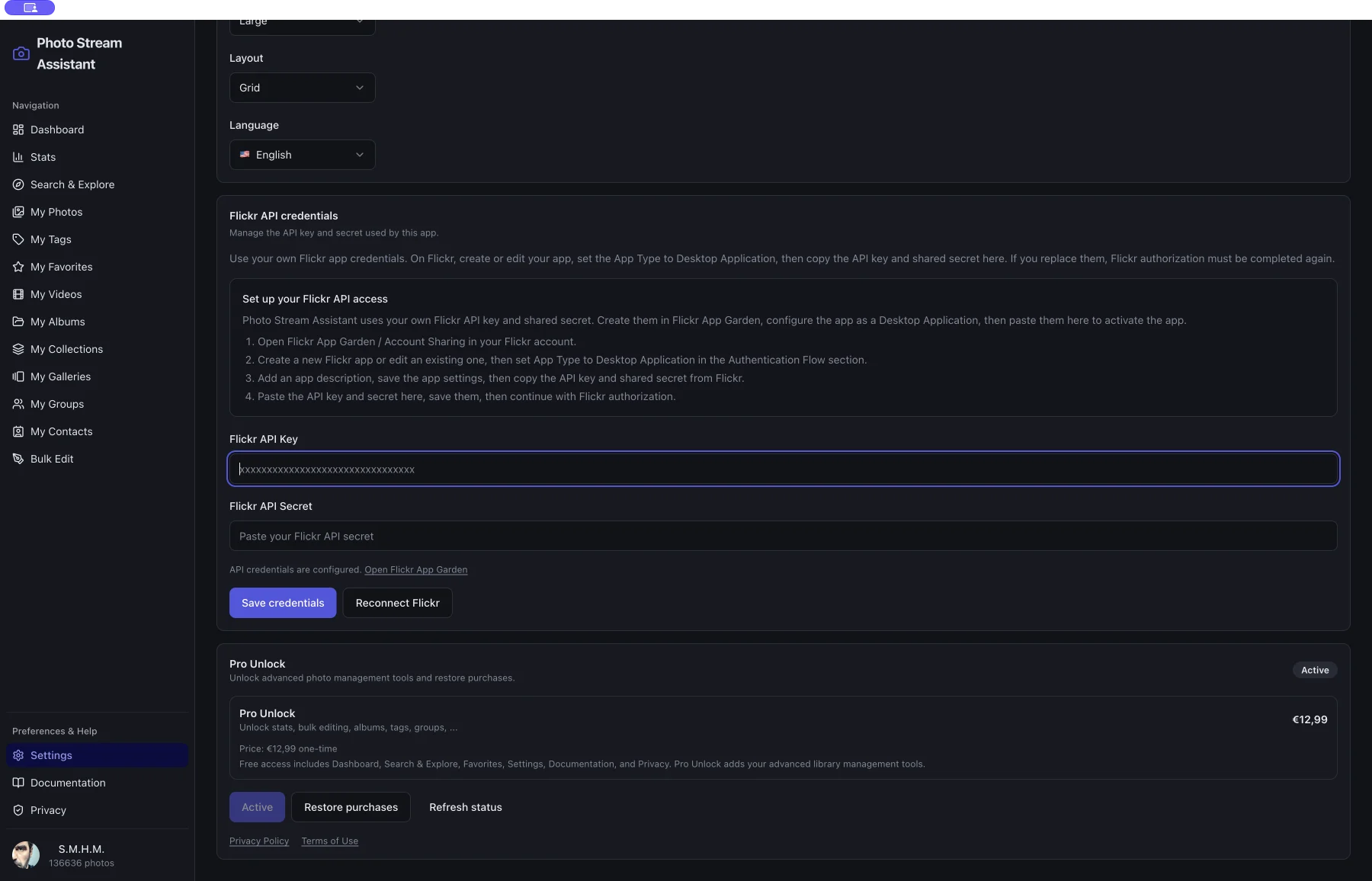
Step by step
1. Sign in to Flickr with a Pro account
Flickr issues API keys only to Pro accounts. A Free account can still use the API through someone else's key, but cannot create one. Sign in on flickr.com before you start, or the App Garden will send you to the login page half way through.
2. Open the App Garden and request a key
Go to flickr.com/services/apps/create and choose Request an API Key. Flickr asks whether the use is commercial or non-commercial. For your own photos in your own app, choose non-commercial: it is granted immediately, where a commercial key goes through a review.
3. Name the app and describe what it does
The name and description are for you and for Flickr, not for anyone else. Something like "Photo Stream Assistant on my computer" is enough. Tick the two boxes that say you have read the terms, then Submit.
4. Copy the key and the secret
Flickr shows both on the next page. The key is public in practice, since it travels in every request. The secret is what signs requests as coming from your app, so treat it like a password: store it only where the app asks for it.
5. Set the app type to Desktop Application
There is no Settings button for this. On your app's page in the App Garden, click the “Edit the authentication flow” link, choose Desktop Application as the App Type, and save. Without this, the sign-in step of a desktop app fails with an error about a missing callback URL, which reads as a bug in the app when it is a setting in Flickr.
6. Paste both values into the app
On first launch, Photo Stream Assistant asks for the key and the secret; later they are in Settings, under Flickr API credentials. Paste both and save. The app then asks you to choose a password of its own: it locks the app on your computer and is not your Flickr password. Last, Continue with Flickr opens Flickr's own sign-in inside the app, where you sign in if needed and allow access. Your Flickr password is only ever typed on Flickr's page, and the key, secret and app password stay on your computer.
Questions
Does a Flickr API key cost anything?
The key itself is free. Creating one requires a Flickr Pro subscription, which is Flickr's decision and applies to every third-party app, not to this one in particular.
Can I use one key in several apps?
You can, but do not. A key is Flickr's way of knowing which app is calling, and the rate limit of about 3,600 requests per hour applies per key. One key per app keeps the limits separate and lets you revoke one app without breaking another.
What can an app do with my key?
Nothing on its own. The key and secret identify the app. Access to your photos comes from a separate authorization step, where Flickr asks you to allow the app and tells you the permission level: read, write, or delete. You can revoke that at any time from your Flickr account's Sharing and Extending page.
Is the app I create public in the App Garden?
No. An app made for a non-commercial key is private, and its page in the App Garden says only you can see it.
Which password does the app ask for?
Two different ones, at two different moments. First a password you choose for Photo Stream Assistant itself, which locks the app on your computer. Then, when you continue to Flickr, your Flickr password, typed on Flickr's own sign-in page and never seen by the app.
Why does the app ask for my own key instead of shipping one?
Because Flickr's rate limit is per key. An app shipping one key for everyone would hit the limit as soon as a few people used it at once. With your own key, your library's requests are yours alone.
In the app
- Flickr Desktop App: Photo Stream Assistant is a desktop app for Flickr on Mac and Windows, built for people with large libraries: browse everything, search and filter, edit in bulk, see your photos on a map, read your contacts feed and your activity, and back the library up to your own disk.
More guides
- How to download your whole Flickr library
- How to rename a tag across all your Flickr photos
- How to bulk edit Flickr photos
- How to geotag Flickr photos, one or hundreds at a time
- How to find duplicate photos on Flickr
- How to upload photos to Flickr from a Mac or PC
Written by Stéphane Monier, who built Photo Stream Assistant for a library of 138,000 photos. Also available as plain Markdown.